
Property Controls
-
Collection+ ID— Use the sameIDas the Collection+ you want to filter. Set up your Collection+ first -
Filter— Triggers the apply or clear filter function. Learn about this concept -
Field Name— Must match the field name in your collection -
Preserve— Enable/disable syncing with filter state. Read about preserving -
Condition— Choose the filter option (see Conditions below)
The Value control is not used; this filter only checks whether a value is set or not.
Interactions
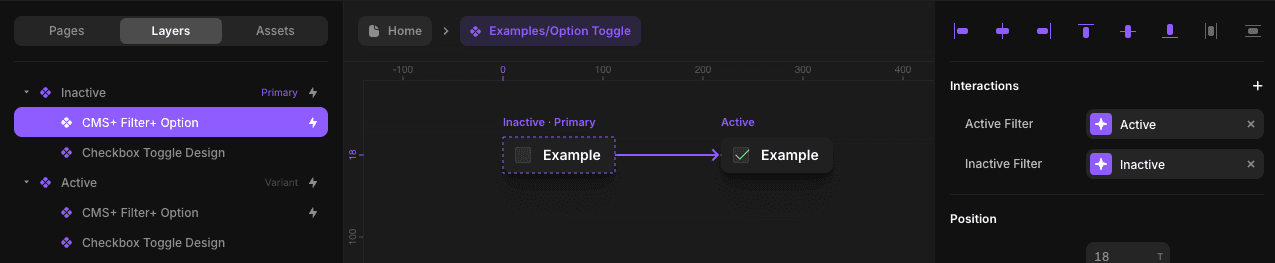
Active Filter— Variant when the filter is appliedInactive Filter— Variant when the filter is cleared
Important: When
Preserveis enabled, set bothActive FilterandInactive Filter. Read about preserving.
Basic Setup
1. Match filter type to field type
Use Filter+ File only with File fields.
2. Integrate into your component
Integrate the File filter into your component. Learn how.
3. Configure controls
Configure controls in the primary variant. If using Preserve, add Active Filter and Inactive Filter interactions.
4. Override in other variant
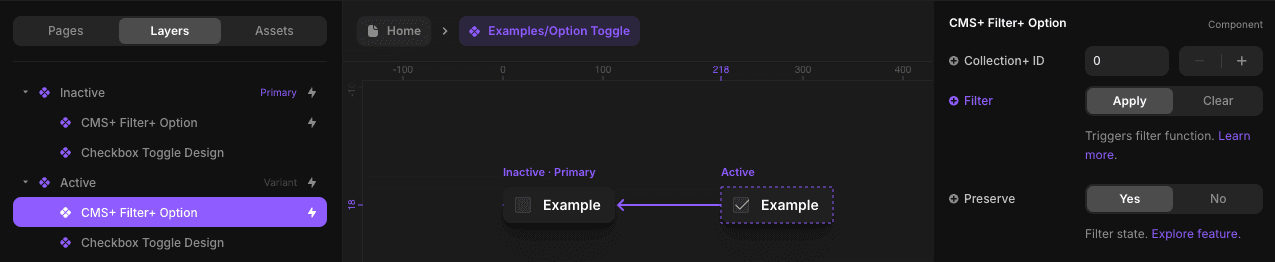
Override Filter in the other variant. Learn about triggering.
Conditions
- Is Set
- Isn’t Set